Workflow rules for the simple cases
A workflow rule reacts to one change: "when the deal's stage becomes Negotiation/Review" or "when the case's priority becomes Critical". It fires on the change itself — not every time the record is saved — and does one thing: create a task for the owner, due in a few days, or set a field.
Flows for everything else
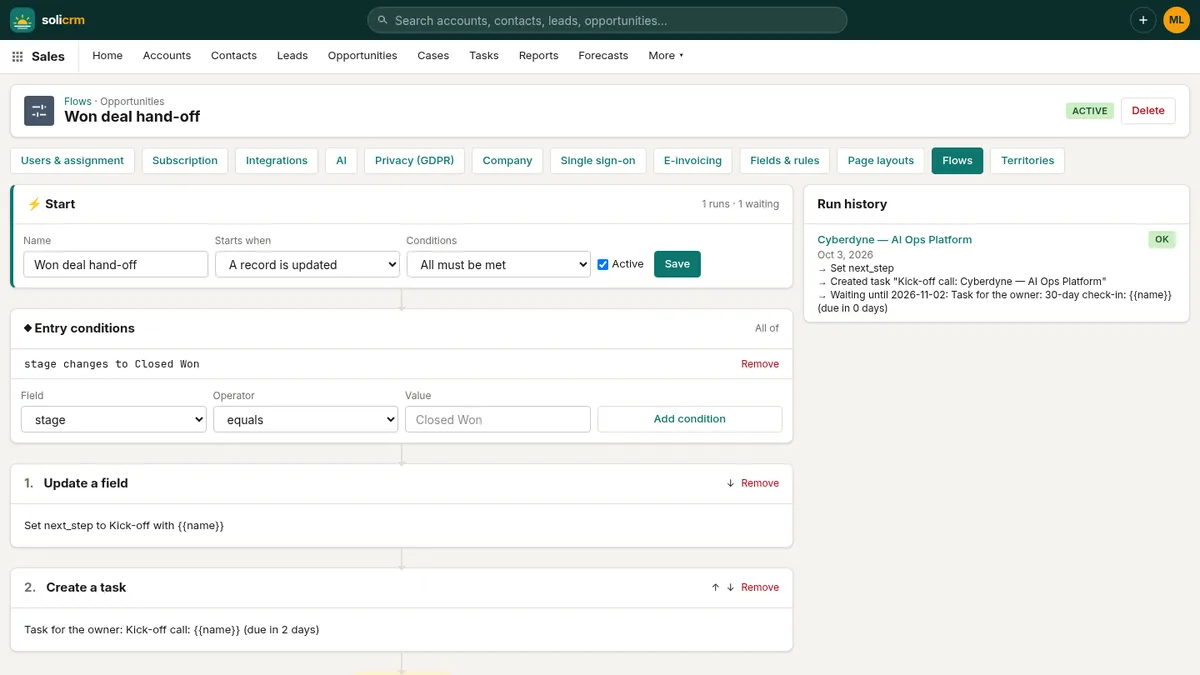
A flow starts when a record of an object — account, contact, lead, opportunity, case — is created, updated, or either. Its entry conditions combine with all or any:
- equals, does not equal, is greater or less than, contains;
- changes, or changes to a value;
- is blank, is not blank.
Then come the steps, in order:
- create a task;
- update a field;
- send an email, to the owner or to an address;
- send a push notification.
Texts can use merge fields — {{name}}, {{amount}} — filled from the record. And any step can wait: "three days after the deal reaches Proposal, if it is still there, remind the owner". Waiting steps are checked every hour, and a wait is dropped when the record no longer meets the conditions — no reminder about a deal that was already won.
Every run is logged, with its count, so you can see what a flow actually did.
Your own fields, your own objects
Add custom fields to any standard object — text, number, date, checkbox or picklist —, required or not. They appear on pages, forms, list filters and the API like the others.
When a whole kind of record is missing, create a custom object — "Projects", "Sites", "Vehicles" — with its own fields and its own pages.
Rules that keep data clean
Validation rules stop a record from being saved half-done: "when the stage is Closed Lost, the loss reason is required", with your own error message. They apply on forms and through the API alike.
Pages laid out per profile
Page layouts decide, per object and per profile (admins, members), which fields show, in what order and under which section headings. Members see what they work with; admins see the rest. Reset brings a profile back to the default.
Custom fields can also be admin-only: hidden from members on pages, forms, filters and the API.
Reports and the home dashboard
The report builder works on opportunities, leads, accounts, contacts, cases and activities: group by one field and optionally a second (shown as a matrix), count or sum amounts, revenue or headcount, limit to your own records or a date range. Every report has a bar chart, an Export CSV, and two options:
- Pin to Home, to put it on the home dashboard;
- email it every morning or every Monday morning to a list of recipients.
Saved list views keep everyone's favourite searches — "My EMEA deals over 100K in Proposal" — one click away.
Who changed what
Key fields are tracked on every record — a deal's stage, amount, close date and owner; a case's status, priority and queue; and so on — with who changed them, when, and from what to what. The history is chained with SHA-256 hashes: Setup shows whether the chain is intact, so a rewritten entry would not go unnoticed.
In short
- Workflow rules for one change, flows with conditions, several steps and scheduled waits.
- Custom fields and custom objects, validation rules, layouts per profile.
- Reports with charts, CSV export, home pinning and scheduled emails.
- A tamper-evident history of key fields.