Every channel becomes a case
- Email: SoliCRM reads your support mailbox every five minutes. Each new email opens a case; a reply that carries the case number in its subject — "[Case 00001234]" — joins that case, and reopens it if it was closed.
- Web: the public
/supportform opens a case directly. - Chat: the
/support/chatpage lets a visitor chat with your team; each conversation is a case of its own. - Phone: agents log calls on the case as they go.
Cases have a priority (Low to Critical), a type (question, problem, feature request), a queue (Customer care, Technical support, Billing, Product) and a status: New, Working, Escalated, Closed. The public forms are protected against floods: ten submissions per ten minutes per address.
Deadlines you can see
Each case gets two SLA milestones from its priority:
| Priority | First response | Resolution |
|---|---|---|
| Critical | 4 h | 24 h |
| High | 8 h | 72 h |
| Medium | 24 h | 5 days |
| Low | 72 h | 10 days |
The case shows each milestone as on track, at risk (under two hours left to respond, under eight to resolve), met or breached. Every fifteen minutes, SoliCRM escalates the new cases past their response deadline and gives their owner a high-priority task — "SLA breached" — and does the same for cases past their resolution deadline.
Assignment rules, then the right agent
Assignment rules sort cases as they arrive: match on priority, channel, type or words in the subject, then set the queue and, if you want, the person. Rules apply in order and the first active match wins.
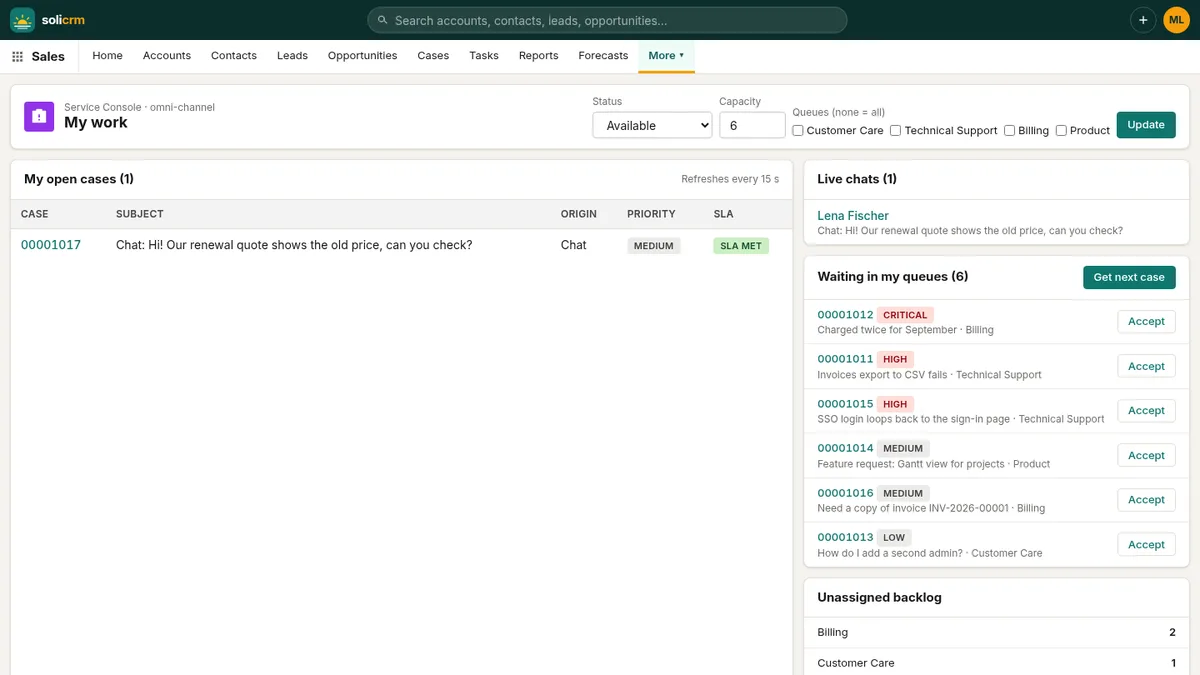
When a case has no owner, the omni-channel console takes over. Each agent sets their presence — available, busy, offline —, their capacity (five open cases by default) and the queues they cover. A new case goes to the least-loaded available agent for its queue. Agents can also click Get next case to pull the most urgent one by SLA, or Accept a case from the waiting list — if a colleague was faster, SoliCRM says so instead of assigning it twice. The console refreshes every fifteen seconds and shows who is online.
Live chat, without a plugin
On /support/chat, a visitor gives their name, optionally their email, and their question. The chat becomes a case routed like any other, and the conversation updates every few seconds on both sides. From an existing case, an agent can also start a chat: the customer receives a private link by email and lands in the conversation.
Answers already written
The knowledge base holds your articles in Markdown — how-tos, troubleshooting, FAQ, policies, release notes —, each with a status (draft, published, archived), versions and a view count. On every case, SoliCRM suggests up to three published articles that match its subject, so the agent starts from an answer that already exists.
A summary for whoever picks it up
A case that changes hands carries its history. With the AI assistant on, Summarise case writes three lines — the problem, what was tried, where it stands — and the next step, from the case's activities and chat messages. The new agent reads ten seconds instead of ten minutes.
In short
- Email, web form, live chat and calls in one list of cases.
- Response and resolution deadlines per priority, with automatic escalation.
- Assignment rules, then routing to the least-loaded available agent.
- Suggested knowledge articles and AI summaries on every case.